
TL;DR
- Desky – Best Overall for certified, USB-C-ready home offices – a 150kg-rated frame, AFRDI certification, and an 18W USB-C port built into the controller
- Secretlab MAGNUS Pro – Best Cable Management for minimal-clutter desks – a recessed cable tray and single-cable power column routed through one leg
- FlexiSpot Comhar Pro Q8 – Best Storage & USB Charging for gear-heavy setups – a built-in drawer plus 45W USB-C, 18W USB-A and wireless charging
- The bottom line: the desk that actually solves cable clutter is the one that’s upfront about what ships standard versus what’s a paid add-on. Check exactly what’s included before comparing price tags.
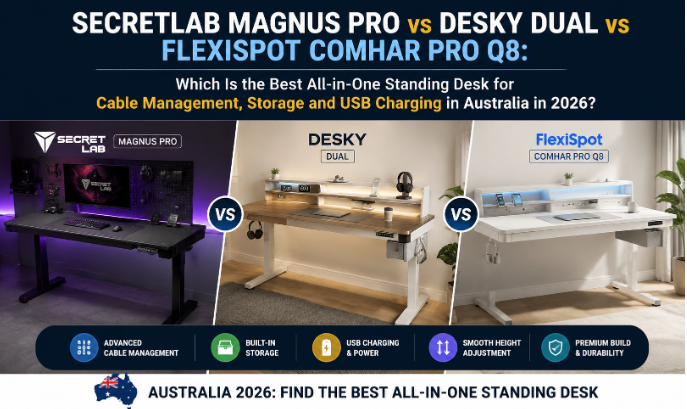
Cable management is the feature every standing desk buyer overpays for or gets wrong. Among the three most talked-about all-in-one standing desk options in Australia this year, Desky’s Dual Melamine Sit Stand Desk takes Best Overall for pairing a certified, 150kg-rated frame with genuinely built-in USB-C charging, not a marketing line. Secretlab’s MAGNUS Pro answers cable management outright with a recessed tray and single-cable power column, while FlexiSpot’s Comhar Pro Q8 is the only one of the three with an actual drawer built in.
Most buyers assume a bigger price tag guarantees built-in everything, but cable management, storage and USB charging come down to frame design, not budget. Gamers, hybrid workers and creators running multiple devices off one desk all need different things from the same three specs. Here’s how these three actually compare past the spec sheet.
This comparison is independent. No brand paid for placement, no affiliate links are used, and nothing here earns a commission.
What Counts as an “All-in-One” Standing Desk?
Cable management, power, storage and charging decide how genuinely all-in-one a standing desk really is, whether those come engineered into the frame or available to add on. Eight factors separate a true all-in-one build from a basic height-adjustable desk:
- Integrated cable management: a tray, channel or column built into the frame, not a clip-on organiser.
- Power access: an outlet or power rail reachable from the desktop without an extension cord.
- USB charging: a USB-A or USB-C port wired into the desk’s own controller, ready for phones and laptops.
- Storage: a drawer or shelf that holds cables and chargers without eating desktop space.
- Accessories: monitor arms and power boards designed to fit the frame, not adapted from a generic desk.
- Desktop organisation: enough surface area to keep a multi-monitor or dual-laptop setup tidy.
- Monitor support: a frame rigid enough at full height to carry a monitor arm without wobble.
- Gaming/workstation compatibility: enough weight capacity and depth for a full peripheral and PC tower setup.
Keep these eight in mind while working through the comparison below.
Feature Matrix
Specs matter more than marketing copy once cable management, storage and charging are compared side by side:
| Feature | Desky Dual Melamine Sit Stand Desk | Secretlab MAGNUS Pro | FlexiSpot Comhar Pro Q8 |
| Award | Best Overall | Best Cable Management | Best Storage & USB Charging |
| Cable management system | Optional Integrated Cable & Data Channel (sold separately) | Built-in recessed tray + magnetic sheaths | Built-in under-desk tray with cable clamps |
| Cable tray | Add-on accessory | Built-in, full-length | Built-in |
| Power access | Optional integrated power board (up to 10 devices) | Single outlet via leg-integrated power column | Built-in outlet + wireless charging pad |
| USB ports | 18W USB-C on controller | None built in | 45W USB-C + 18W USB-A |
| Storage | None built in | None | Built-in drawer (28.3″ x 12.8″ x 1.97″) |
| Drawers | None | None | 1, built in |
| Desktop size | 1200-2000mm x 750mm (4 sizes) | 1500x700mm (Pro), 1770x800mm (Pro XL) | approx. 1400mm x 700mm bamboo top |
| Height adjustment | 60-125cm | 65-125cm | 61-125cm |
| Weight capacity | 150kg | 125kg | 100kg |
| Control system | App + Siri, 4 presets | Electronic height controller | LED touchscreen, 4 presets |
| Accessories | Cable channel, monitor arms (sold separately) | Monitor mounts, cable sheaths, RGB strip (extra cost) | Wireless charging pad, monitor-mount block included |
| Warranty | 10 years frame/electronics, 5 years desktop | 5 years | 15 years frame/electronics, 5 years desktop |
Desky Dual Melamine Sit Stand Desk – Best Overall for certified, USB-C-ready home offices
Desky’s Dual Standing Desk earns Best Overall by pairing certification with genuinely built-in charging, not by promising cable management it doesn’t ship with. The controller carries an 18W USB-C port wired directly into the desk, so a phone charges without a separate power board plugged in. The frame is rated to 150kg and carries AFRDI, BIFMA, EESS and TÜV Rheinland certification, credentials most budget frames don’t carry.
Cable management on the Dual is a purpose-built accessory, the Integrated Cable & Data Channel, sold separately rather than included. Once fitted, it consolidates power for up to 12 devices through a single plug, so buyers comparing this against Secretlab’s built-in tray should budget for the add-on. The same certified frame underpins Desky’s L-Shaped desks too, worth a look for a future corner setup.
Desky’s build quality has drawn outside coverage beyond its own marketing. The Canberra Times ranked the Dual Melamine Sit Stand Desk among Australia’s nine best standing desks, citing its “cutting-edge cable management technology” among the reasons. Independently, the desk carries a 4.5 out of 5 rating across 1,223 reviews on ProductReview.com.au.
“Excellent quality items. I bought a dual desk, monitor stand, filing cabinet and mobile pedestal. […] The desk and cable management tray was relatively easy to put together.” – arantius, NSW, 5 ⭐ on ProductReview.com.au (May 2026)
Strengths:
- 150kg-rated, certified frame (AFRDI, BIFMA, EESS, TÜV Rheinland)
- 18W USB-C port built into the controller
- App and Siri control with 4 height presets
- 10-year warranty on frame/electronics, 5 years on the desktop
Limitations:
- Cable management is a separately sold accessory
- No built-in storage drawer
Recommended for: Certified-build buyers who want built-in USB-C charging and don’t mind adding cable management separately.
Watch Desky: https://www.youtube.com/watch?v=LfJM-zNqX-c
Get in touch:
Address: 2620 Ipswich Road, Darra, QLD 4076 (HQ and Click & Collect); showroom at 865 Stanley St, Woolloongabba, QLD 4102
Phone: (07) 3088 9131
Instagram: @deskyau
Secretlab MAGNUS Pro – Best Cable Management for minimal-clutter desks
Secretlab’s MAGNUS Pro solves cable clutter at the frame level instead of leaving it to an accessory. A recessed tray runs the length of the desk, and a single cable slot through the left leg connects to an integrated power column, so only one cord reaches the wall.
Windows Central’s review called it outright “the standing king of cable management,” and TechRadar’s independent testing reached a similarly positive verdict.
The tradeoff is what the MAGNUS Pro leaves out. There’s no storage drawer at all, unusual at this price point, and no USB port is built in, just the single power outlet in the leg. A fully accessorised setup also adds roughly A$49 to A$249 on top of the base price, which starts from around A$1,319.
By the way, Secretlab’s own MAGNUS Pro product page carries a verified 1-star buyer review from mid-2026 describing a drawn-out customer service dispute over incorrect order information, so it’s worth reading a few reviews yourself before ordering.
Strengths:
- Built-in recessed cable tray running the full length of the desk
- Single-cable power column integrated into the leg
- Magnetic cable sheaths included for visible cords
- 125kg weight capacity suits multi-monitor gaming rigs
Limitations:
- No storage drawer
- No built-in USB ports, only one power outlet
- 5-year warranty, shorter than the other two desks here
Recommended for: Buyers who want the cleanest cable routing out of the box and can skip storage to get it.
Get in touch:
Address: ships to Australia via its dedicated AU storefront (AUD pricing); no public Australian retail address listed
Phone: not publicly listed for Australian customers
Instagram: @secretlab
FlexiSpot Comhar Pro Q8 – Best Storage & USB Charging for gear-heavy setups
FlexiSpot’s Comhar Pro Q8 is the only desk here with an actual drawer built into the frame, sized at 28.3 by 12.8 by 1.97 inches, big enough for cables, a spare charger and small stationery. Charging is built in too: a 45W USB-C port and an 18W USB-A port sit next to a wireless charging pad, all wired into the desk itself.
Tom’s Hardware flagged two real drawbacks in testing: noticeable motor noise and poor collision detection that keeps bumping into objects even on its highest sensitivity setting. Warranty coverage is strong on paper, 15 years on the frame, motor, and electronics, though the desk carries a thinner independent review history in Australia than the other two.
Strengths:
- Built-in drawer, the only real storage of the three desks
- 45W USB-C + 18W USB-A ports and a wireless charging pad, all built in
- 15-year warranty on frame, motor, and electronics
- Includes a mounting block for a monitor arm
Limitations:
- Noticeable motor noise during height changes
- Collision detection is inconsistent at maximum sensitivity
- Lower weight capacity (100kg) than the other two desks
Recommended for: Buyers who want charging and storage solved inside the desk, without managing separate accessories.
Get in touch:
Address: Suite 302, 432 St Kilda Road, Melbourne VIC 3004
Phone: +61 3 6161 3555
Facebook: facebook.com/FlexiSpotAU
Best Desk for Different Australian Setups
Your setup decides the right pick here, not a single winner on a spec sheet. Match the desk to how you actually work:
- Gaming PC setup: Secretlab MAGNUS Pro. Its built-in tray keeps a multi-peripheral rig tidy without extra accessories.
- Dual-monitor office: Desky Dual. The 150kg-rated frame handles two monitor arms without flexing.
- Laptop workstation: FlexiSpot Comhar Pro Q8. Wireless charging and 45W USB-C cover a single-laptop docking setup alone.
- Creator workstation: FlexiSpot Comhar Pro Q8. The built-in drawer holds spare SSDs and cables off the desktop.
- Hybrid work setup: Desky Dual. App and Siri control keep height presets consistent across a home office and a shared desk.
- Minimalist office: Secretlab MAGNUS Pro. The floating top and hidden routing leave nothing visible on the desktop.
- Cable-heavy workstation: Desky Dual. Its optional accessory routes up to 10 devices through one plug once fitted.
FAQs
What makes a standing desk “all-in-one” rather than just height-adjustable?
An all-in-one standing desk addresses cable management, power access and often storage or charging as part of the frame’s design, whether those ship standard or as a matched accessory, rather than leaving buyers to improvise with generic clip-on organisers. Height adjustment alone, without those extras accounted for, is just a sit-stand desk.
Is built-in cable management always better than an add-on accessory?
Built-in systems need no extra purchase, while add-ons like Desky’s Integrated Cable & Data Channel cost more but let buyers skip the feature if they don’t need it. Neither approach wins outright, it depends on whether the cost should be bundled in or kept optional.
Do built-in USB ports or wireless charging pads slow down a standing desk’s motor?
No, USB charging ports and wireless charging pads run on a separate low-voltage circuit from the lifting motor, so they don’t affect lifting speed or noise. Motor performance comes down to the drive system, not the accessories wired into the controller.
Does the Desky Dual come with cable management included in the box?
No, the Integrated Cable & Data Channel is a separately sold accessory, not something that ships standard. Buyers who want cable routing from day one should factor that cost in before comparing the sticker price to Secretlab’s built-in tray.
Is Desky’s app and Siri control reliable for everyday height adjustments?
Yes, the Dual’s app and Siri integration lets users save up to four height presets and switch between sitting and standing with a voice command, on top of the physical controller buttons. Initial setup requires pairing a smartphone, the one extra step versus a manual controller.
The Bottom Line
Desky Dual Melamine Sit Stand Desk is the strongest all-round pick for most Australian buyers: a certified, 150kg-rated frame with genuinely built-in USB-C charging, backed by a decade-long warranty on the parts that matter most. Secretlab’s MAGNUS Pro is the better choice specifically for cable management, and FlexiSpot’s Comhar Pro Q8 earns its place for buyers who want storage and charging solved without extra accessories.
Check what’s actually built in versus sold separately before comparing final prices. None of the three is a bad standing desk choice, the right one just depends on which feature matters most.

 Bernard W. has opinions about art techniques and methods. Informed ones, backed by real experience — but opinions nonetheless, and they doesn't try to disguise them as neutral observation. They thinks a lot of what gets written about Art Techniques and Methods, Trends in Contemporary Art, Exhibition Announcements and Reviews is either too cautious to be useful or too confident to be credible, and they's work tends to sit deliberately in the space between those two failure modes.
Reading Bernard's pieces, you get the sense of someone who has thought about this stuff seriously and arrived at actual conclusions — not just collected a range of perspectives and declined to pick one. That can be uncomfortable when they lands on something you disagree with. It's also why the writing is worth engaging with. Bernard isn't interested in telling people what they want to hear. They is interested in telling them what they actually thinks, with enough reasoning behind it that you can push back if you want to. That kind of intellectual honesty is rarer than it should be.
What Bernard is best at is the moment when a familiar topic reveals something unexpected — when the conventional wisdom turns out to be slightly off, or when a small shift in framing changes everything. They finds those moments consistently, which is why they's work tends to generate real discussion rather than just passive agreement.
Bernard W. has opinions about art techniques and methods. Informed ones, backed by real experience — but opinions nonetheless, and they doesn't try to disguise them as neutral observation. They thinks a lot of what gets written about Art Techniques and Methods, Trends in Contemporary Art, Exhibition Announcements and Reviews is either too cautious to be useful or too confident to be credible, and they's work tends to sit deliberately in the space between those two failure modes.
Reading Bernard's pieces, you get the sense of someone who has thought about this stuff seriously and arrived at actual conclusions — not just collected a range of perspectives and declined to pick one. That can be uncomfortable when they lands on something you disagree with. It's also why the writing is worth engaging with. Bernard isn't interested in telling people what they want to hear. They is interested in telling them what they actually thinks, with enough reasoning behind it that you can push back if you want to. That kind of intellectual honesty is rarer than it should be.
What Bernard is best at is the moment when a familiar topic reveals something unexpected — when the conventional wisdom turns out to be slightly off, or when a small shift in framing changes everything. They finds those moments consistently, which is why they's work tends to generate real discussion rather than just passive agreement.